
📄 My Formula Page #
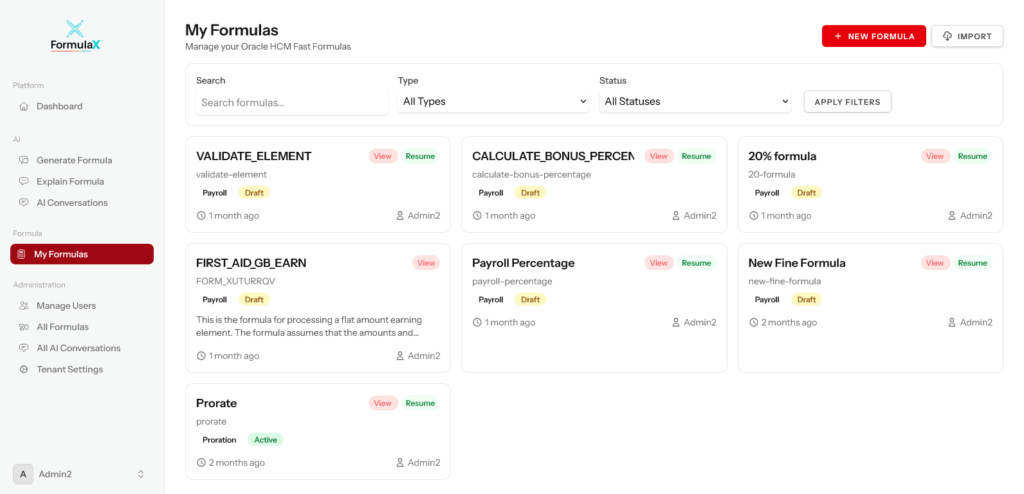
The My Formula page is the central workspace in FormulaX where users can view, manage, and interact with all formulas they have created or imported from Oracle. It provides a streamlined list of formulas along with metadata and quick actions, allowing users to efficiently navigate, organize, and modify their formula library.
🔍 What You Can Do on the My Formula Page #
The page offers complete control over formula records, including:
| Capability | Description |
|---|---|
| View all formulas | Displays every formula created or imported by the user |
| Search & filter | Quickly locate formulas using keywords, types, categories, or tags |
| Create new formula | Direct option to start building a new fast formula |
| Edit formula | Open a formula in the builder for modification |
| Clone formula | Duplicate a formula for reuse with different logic |
| Delete formula | Permanently remove formulas that are no longer required |
| Export formula | Download formula in Oracle-compatible format |
| Deploy to Oracle | Push selected formulas directly into Oracle environments (if enabled) |
| View version history | Access all revisions for each formula with timestamps |
🧠 Layout Overview #
Typical sections of the My Formula page include:
- Formula List Table – displays formula name, type, status, created date, modified date, and owner.
- Action Menu / Buttons – options like Edit, Copy/Clone, Deploy, and Delete.
- Filters Panel – search box, dropdowns for type, category, status, and owner.
- Bulk Actions – select multiple formulas for batch export, deployment, or deletion.