

- ⚡ Generate or Optimize Formula
- 🎯 What This Feature Does
- 🚀 How to Generate a New Formula
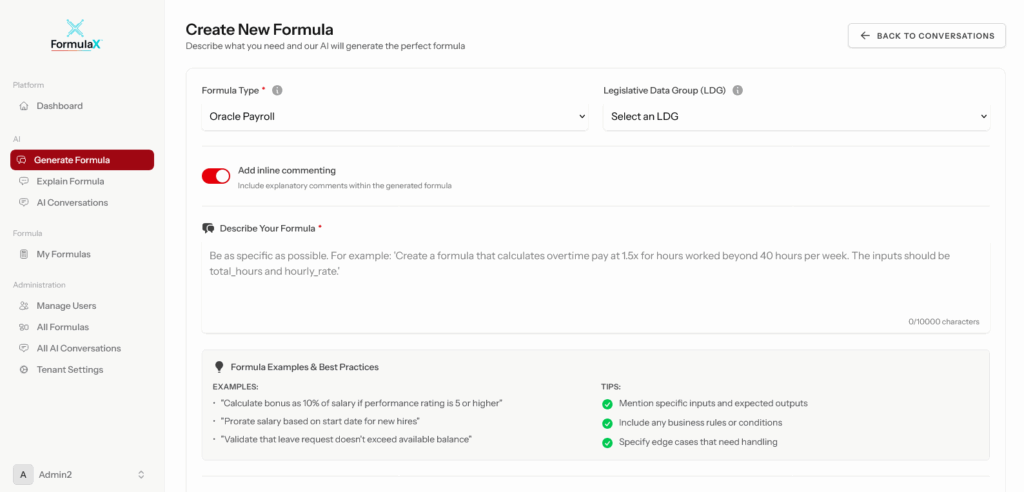
- Step 1: Select Formula Type
- Step 2: Choose Legislative Data Group (if applicable)
- Step 3: Toggle "Add Inline Commenting"
- Step 4: Describe Your Requirements
- Step 5: Review Formula Examples & Best Practices
- Step 6: Click "Generate Formula"
- Step 7: Review the Generated Formula
- Step 8: Refine Through Conversation
- Step 9: Save Your Formula
- 🔧 How to Optimize an Existing Formula
- Step 1: Access Optimize Mode
- Step 2: Paste Your Formula Code
- Step 3: Specify What to Optimize
- Step 4: Review Optimized Formula
- Step 5: Save the Optimized Version
- 💬 Advanced Features Through AI Conversation
- 1. Add Inline Comments
- 2. Translate Formulas
- 3. Improve Existing Formulas
- 4. Test and Validate
- 5. Get Explanation
- 📋 Formula Configuration Options
- Formula Type
- Legislative Data Group (LDG)
- Inline Commenting Toggle
- ✅ What You Get After Generation
- 🎓 Formula Saving and Management
- Why Save Formulas?
- How to Save
- 💡 Best Practices for Generation
- Writing Effective Prompts
- Formula Optimization Tips
- 🔍 Common Use Cases
- 1. Payroll Calculations
- 2. Absence Accruals
- 3. Element Skip Rules
- 4. Rate Calculations
- 5. Legacy Formula Modernization
- ⚙️ Advanced Options
- Formula Validation
- AI Conversation History
- Integration with Other Features
- ❓ Frequently Asked Questions
⚡ Generate or Optimize Formula #
FormulaX’s Generate or Optimize Formula feature is the core AI-powered engine that transforms your business requirements into production-ready Oracle Fast Formulas. Whether you’re creating a brand new formula from scratch or improving an existing one, FormulaX delivers clean, efficient, syntactically correct code in seconds—no manual coding required.
🎯 What This Feature Does #
With Generate or Optimize Formula, you can:
Create New Formulas
- Generate Oracle Fast Formulas from plain-English descriptions
- Automatically select appropriate formula types (Payroll, Absence, Element, etc.)
- Include proper INPUTS, variables, logic, and RETURN statements
- Follow Oracle best practices and naming conventions
- Ensure Oracle Cloud HCM 25d compatibility
Optimize Existing Formulas
- Improve formula structure and efficiency
- Fix syntax errors and compilation issues
- Remove redundant logic and calculations
- Simplify complex nested conditions
- Add error handling and validation
- Modernize legacy formulas to current standards
Enhance Generated Code
- Add inline comments for better documentation
- Translate formulas to different languages
- Refine logic through conversational AI
- Test and validate before deployment
- Save formulas to your library for reuse
🚀 How to Generate a New Formula #
Step 1: Select Formula Type #
Choose the appropriate formula type from the dropdown:
- Oracle Payroll – For earnings, deductions, and payroll calculations
- Absence – For leave accruals and absence management
- Element – For element input values
- Time Calculation – For time entry processing
- Rate Calculation – For complex rate determinations
- Validation – For data validation rules
- Custom – For specialized use cases
Step 2: Choose Legislative Data Group (if applicable) #
Select the LDG if your formula needs to be legislature-specific (e.g., UK, US, Canada).
Step 3: Toggle “Add Inline Commenting” #
Enable this option to automatically include descriptive comments throughout your formula code. This makes the formula easier to understand and maintain.
Benefits of Inline Commenting:
- Explains what each section does
- Helps with knowledge transfer and onboarding
- Makes formulas easier to troubleshoot
- Provides context for future modifications
- Meets documentation requirements for audits
Step 4: Describe Your Requirements #
In the text area, describe what you need the formula to do. Be as specific as possible.
Example Good Prompt:
Create a formula that calculates overtime pay at 1.5x the regular rate
for hours worked beyond 40 hours per week.

INPUTS:
- hours_worked (number): Total hours worked in the week
- hourly_rate (number): Employee's regular hourly rate

CALCULATION:
- Standard hours threshold: 40 hours per week
- Overtime rate: 1.5 times the regular rate
- If hours worked ≤ 40, no overtime
- If hours worked > 40, calculate overtime pay for excess hours

OUTPUT:
- l_overtime_pay (number): Total overtime payment amount
See the Quick Start Guide for more prompt writing tips and examples.
Step 5: Review Formula Examples & Best Practices #
The panel shows helpful tips:
- ✅ Be as specific as possible
- ✅ Mention specific inputs and expected outputs
- ✅ Include any business rules or conditions
- ✅ Specify edge cases that need handling
Step 6: Click “Generate Formula” #
FormulaX’s AI analyzes your requirements and generates the complete Fast Formula code.
Step 7: Review the Generated Formula #
The AI returns:
- Complete, syntactically correct Oracle Fast Formula code
- Proper INPUTS declarations with data types
- All necessary variables and calculations
- Appropriate RETURN statements
- Inline comments (if enabled)
- Explanation of the logic
Step 8: Refine Through Conversation #
Don’t like something? Continue the conversation:
- “Add validation for negative values”
- “Include a check for null inputs”
- “Simplify the logic in the overtime calculation”
- “Add more detailed comments”
- “Change the rounding to 2 decimal places”
Step 9: Save Your Formula #
Click “Save as Formula” to store it in My Formulas for:
- Easy access and reuse
- Version control and history tracking
- Sharing with team members
- Future editing and optimization
- Documentation and audit trails
🔧 How to Optimize an Existing Formula #
Already have a formula that needs improvement? FormulaX can help.
Step 1: Access Optimize Mode #
From the Generate or Optimize Formula page, you can paste existing formula code.
Step 2: Paste Your Formula Code #
Copy your existing Fast Formula from Oracle Cloud HCM and paste it into the conversation.
Say something like:
- “Optimize this formula for better performance”
- “Fix any syntax errors in this formula”
- “Add inline comments to this formula”
- “Simplify the logic in this formula”
Step 3: Specify What to Optimize #
Tell the AI what you want to improve:
Performance Optimization
- “Make this formula more efficient”
- “Remove redundant calculations”
- “Optimize database item calls”
Code Quality
- “Fix syntax errors”
- “Improve variable naming”
- “Add error handling”
- “Follow Oracle best practices”
Documentation
- “Add inline comments explaining each section”
- “Add comments for all business rules”
- “Include header documentation”
Logic Improvements
- “Simplify nested IF statements”
- “Reduce code complexity”
- “Make the logic more readable”
Step 4: Review Optimized Formula #
The AI returns the improved version with:
- Explanation of changes made
- Before/after comparison
- Performance improvements highlighted
- Maintained functionality verification
Step 5: Save the Optimized Version #
Click “Save as Formula” and choose:
- Save as new version – Keeps history of the original
- Replace existing – Updates the current formula
- Save as new formula – Creates a separate copy
💬 Advanced Features Through AI Conversation #
The Generate/Optimize feature creates an AI conversation thread where you can:
1. Add Inline Comments #
After generating a formula, request:
- “Add inline comments to this formula”
- “Explain each calculation step with comments”
- “Add comments for all business rules”
- “Include detailed header documentation”
Example Output:
/* *********************************************************************************
       FORMULA NAME  : CALCULATE_WEEKLY_OVERTIME_PAY
       FORMULA TYPE  : Oracle Payroll
       DESCRIPTION   : Calculates overtime pay at 1.5x the regular hourly rate
                       for hours worked beyond 40 hours per week.
       AUTHOR        : FormulaX AI
       VERSION       : 1.0
       LDG           : N/A

********************************************************************************* */

DEFAULT FOR HOURS_WORKED IS 0    /* Default to 0 hours if input missing */
DEFAULT FOR HOURLY_RATE IS 0    /* Default to 0 rate if input missing */

INPUTS ARE
  HOURS_WORKED,
  HOURLY_RATE

/* If hours worked are 40 or less, there's no overtime pay */
IF (HOURS_WORKED <= 40) THEN
(
  L_OVERTIME_PAY = 0    /* No overtime — total overtime payment is zero */
)
ELSE
(
  /* Compute overtime hours: any hours beyond the 40-hour standard threshold */
  L_OVERTIME_HOURS = HOURS_WORKED - 40

  /* Overtime rate is 1.5 times the regular hourly rate (time-and-a-half) */
  L_OVERTIME_RATE = HOURLY_RATE * 1.5

  /* Total overtime pay equals overtime hours multiplied by the overtime rate */
  L_OVERTIME_PAY = L_OVERTIME_HOURS * L_OVERTIME_RATE
)

RETURN L_OVERTIME_PAY
2. Translate Formulas #
Translate variable names, comments, or business logic to different languages:
- “Translate all comments to French”
- “Convert variable names to Spanish”
- “Provide German documentation for this formula”
Note: The Fast Formula syntax remains in English (Oracle requirement), but comments and documentation can be translated.
3. Improve Existing Formulas #
Continuous refinement through conversation:
- “Add validation for salary being greater than zero”
- “Include handling for part-time employees”
- “Add a cap of £500 for the bonus amount”
- “Round all currency values to 2 decimal places”
4. Test and Validate #
Ask the AI to help validate:
- “What happens if hours_worked is negative?”
- “Show me an example calculation with sample values”
- “What values should I test with?”
- “Are there any edge cases I should consider?”
5. Get Explanation #
Request clarification on any part:
- “Explain how the overtime calculation works”
- “What does the DAYS_BETWEEN function do?”
- “Why is this variable declared as NUMBER(15,2)?”
📋 Formula Configuration Options #
When generating formulas, you can configure:
Formula Type #
Determines the formula structure and available contexts:
- Payroll formulas have access to payroll-specific DBIs
- Absence formulas can use absence accrual contexts
- Element formulas work with element entry values
Legislative Data Group (LDG) #
Specify if your formula needs to comply with specific legislation:
- UK Payroll (GBR)
- US Payroll (US)
- Canada Payroll (CA)
- Blank (GLOBAL)
Inline Commenting Toggle #
Enable to automatically add:
- Header comments with formula purpose
- Section comments for major logic blocks
- Inline explanations for complex calculations
- Business rule documentation
- Variable purpose descriptions
This feature is invaluable for:
- Team collaboration
- Knowledge transfer
- Audit requirements
- Future maintenance
- Onboarding new consultants
✅ What You Get After Generation #
FormulaX delivers a complete package:
✓ Production-Ready Code
- Syntactically correct Oracle Fast Formula
- Proper variable declarations
- Correct data types (NUMBER, TEXT, DATE)
- Valid RETURN statements
- No compilation errors
✓ Best Practices Applied
- Follows Oracle naming conventions
- Efficient logic structure
- Appropriate use of database items
- Error handling included
- Null value checks
✓ Documentation
- Inline comments (if enabled)
- Plain-English explanation
- Input/output descriptions
- Business logic summary
- Edge case handling notes
✓ Action Options
- Copy Formula – Copy to clipboard for pasting into Oracle Cloud HCM
- Save as Formula – Store in My Formulas library
- Continue Editing – Refine through AI conversation
- Explain – Get detailed explanation of the generated code
- Share – Share with team members (if enabled)
🎓 Formula Saving and Management #
Every formula you generate can be saved to My Formulas for future use.
Why Save Formulas? #
Reusability
- Use as templates for similar requirements
- Clone and modify for different scenarios
- Share with team members
Version Control
- Track all changes and modifications
- Revert to previous versions if needed
- See who made what changes and when
Organization
- Categorize by type (Payroll, Absence, etc.)
- Tag formulas for easy searching
- Filter by status (Draft, Active, Archived)
Documentation
- Maintain explanation and context
- Keep AI conversation history
- Store test cases and sample values
How to Save #
- After generation, click “Save as Formula”
- Enter formula details:
- Formula Code (unique identifier)
- Formula Name (descriptive name)
- Status (Draft/Active)
- Description (what it does)
- Tags (for searching)
- Click Save
The formula appears immediately in My Formulas where you can:
- View the complete code
- Edit and create new versions
- Clone for new formulas
- Export for deployment
- Delete if no longer needed
💡 Best Practices for Generation #
Writing Effective Prompts #
Be Specific About Business Logic
❌ “Create a bonus formula”
✅ “Create a quarterly bonus formula that pays 10% of salary for performance ratings 4-5, 5% for rating 3, and nothing for ratings 1-2”
Define All Inputs Clearly
❌ “Use salary and rating”
✅ “INPUTS: BASE_SALARY (number) – annual salary in GBP, PERFORMANCE_RATING (number) – quarterly rating from 1-5”
Specify Edge Cases
❌ “Calculate overtime”
✅ “Calculate overtime for hours > 40 per week, but if hours_worked is null or negative, return zero”
Include Oracle Context
❌ “Get employee grade”
✅ “Use GET_CONTEXT to retrieve ASSIGNMENT_GRADE_NAME from PER_ASSIGNMENT_F”
Request Inline Comments
✅ Enable “Add Inline Commenting” toggle for automatic documentation
✅ Or request: “Add detailed inline comments explaining each business rule”
Formula Optimization Tips #
Start Simple, Then Refine
- Generate basic formula first
- Test the logic
- Add complexity through conversation
- Optimize for performance
- Add final documentation
Use Conversational Refinement
Rather than regenerating from scratch, refine through conversation:
- “Add handling for null values”
- “Include rounding to 2 decimal places”
- “Optimize the nested IF statements”
Test Before Saving
- Ask for example calculations
- Request edge case scenarios
- Verify business logic matches requirements
🔍 Common Use Cases #
1. Payroll Calculations #
Generate formulas for:
- Overtime pay calculations
- Shift differential rates
- Bonus and commission calculations
- Tax calculations and deductions
- Allowance computations
Example Prompt:
Create a night shift differential formula that pays an extra
£2.50 per hour for hours worked between 10 PM and 6 AM.

INPUTS:
- shift_start_time (text): Format 'HH24:MI'
- shift_end_time (text): Format 'HH24:MI'
- hourly_rate (number): Base pay rate
- hours_worked (number): Total hours in shift

Include validation for invalid time formats.
2. Absence Accruals #
Generate formulas for:
- Annual leave accrual calculations
- Sick leave balances
- Proration based on hire date
- Carryover calculations
3. Element Skip Rules #
Generate formulas that determine:
- When to process or skip elements
- Eligibility conditions
- Effective date validations
4. Rate Calculations #
Generate complex rate determinations:
- Tiered commission structures
- Multi-factor rate calculations
- Currency conversions
- Regional rate adjustments
5. Legacy Formula Modernization #
Optimize old formulas to:
- Current Oracle Cloud HCM standards
- Improved performance
- Better documentation
- Simplified logic
⚙️ Advanced Options #
Formula Validation #
Before saving, validate your formula:
- Syntax checking
- Data type verification
- Business logic review
- Test case execution
AI Conversation History #
All generation and optimization sessions are saved in AI Conversations:
- Review past formula discussions
- Continue previous sessions
- Learn from examples
- Share with team members
Integration with Other Features #
- Explain Formula: Paste generated code to get detailed explanation
- Edit Saved Formula: Modify formulas after saving
- View Saved Formula: Review formulas in read-only mode
- My Formulas: Access all saved formulas
❓ Frequently Asked Questions #
Q: How accurate are AI-generated formulas?
A: FormulaX uses Oracle best practices and is trained on Oracle Cloud HCM 25d. However, always test formulas in your environment before production deployment.
Q: Can I edit formulas after generation?
A: Yes! Continue the AI conversation to refine, or save and edit later in Edit Saved Formula.
Q: Do I need to know Fast Formula syntax?
A: No! That’s the point. Describe your requirements in plain English and FormulaX handles the technical syntax.
Q: Can I optimize formulas from older Oracle versions?
A: Yes, paste any Fast Formula code and request optimization for current Oracle Cloud HCM standards.
Q: What if the generated formula doesn’t compile in Oracle?
A: Paste the error message back into the conversation and FormulaX will fix it.
Q: Can I translate the entire formula to another language?
A: Fast Formula syntax must remain in English (Oracle requirement), but comments and documentation can be translated.
Q: How do I add inline comments after generating?
A: Either


