
• FormulaX Application is live Now
  • Home
  • Services
    • // Services

      Our Services

      Latest Products

      • HCM Work Flow NEW
      • Access Intelligence for Oracle Cloud NEW

      Digital Transformation

      • Training
      • SEO

      Oracle Fusion HCM Cloud

      • Integrations – Oracle Fusion
      • Fusion HCM
      • Load Work Schedules
      • Oracle Reporting Permissions
      • Access Intelligence for Oracle Cloud HCM
      • FormulaX – AI Fast Formula Generator

      Tech AI

      • FormulaX – AI Fast Formula Generator
      • Access Intelligence for Oracle Cloud HCM
  • About Us
    • Awards
    • Careers
    • White Papers
    • Oracle Cloud Marketplace
    • Give Back Programme
    • Modern Slavery and Human Trafficking
    • Compliance & Ethics
    • FormulaX™ Private Beta / Early Access
  • Public Sector
    • Digital Outcomes
  • Contact
Book a Consultation
  • FormulaX Application is live Now
MKSK Consulting
  • Home
  • Services
    • Digital Transformation
      • Oracle Training
      • SEO
    • Oracle Fusion HCM Cloud
      • Integrations – Oracle Fusion
      • Oracle Fusion HCM
      • Load Work Schedules
      • Oracle Reporting Permissions
      • FormulaX – AI Fast Formula Generator
      • Access Intelligence for Oracle Cloud HCM
    • Tech AI
      • FormulaX – AI Fast Formula Generator
      • Access Intelligence for Oracle Cloud HCM
  • About Us
    • Awards
    • Careers
    • White Papers
    • Oracle Cloud Marketplace
    • Give Back Programme
    • Modern Slavery and Human Trafficking
    • Ethics, Anti-Corruption & Business Courtesies Policy
    • FormulaX™ Private Beta / Early Access
  • Public Sector
    • Digital Outcomes
  • Contacts

AI

2
  • Chat Screen
  • Conversation List

Formula

5
  • Explain Formula
  • Generate or Optimize Formula
  • My Formulas
  • View Saved Formula
  • Edit Saved Formula

Getting Started

3
  • Dashboard
  • FormulaX Overview
  • 🚀 Quick Start Guide

Settings

3
  • Theme Chooser
  • Password Change
  • Setting Change

Support Features

2
  • Create a support ticket
  • Request a Feature
View Categories
  • Home
  • Docs
  • Getting Started
  • Dashboard

Dashboard

3 min read

The Dashboard is your central command center in FormulaX, providing a comprehensive overview of your organization’s formula management activity and AI usage statistics.

Overview #

The Dashboard displays real-time metrics, quick action shortcuts, and recent activity to help you monitor and manage your Oracle Fast Formula development workflow efficiently.
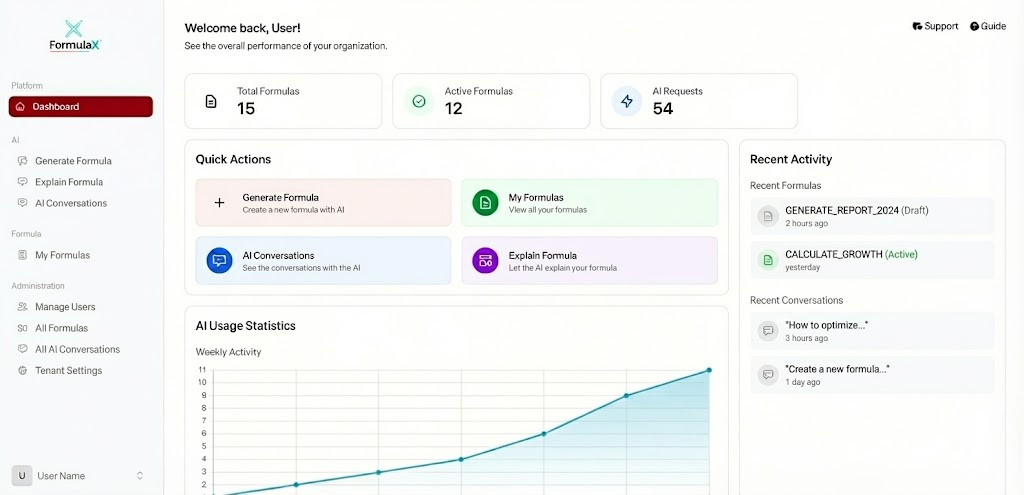
Dashboard 1

Key Metrics #

Total Formulas #

The complete count of all formulas created in your organization, including both active and draft formulas across all users.

Active Formulas #

The number of formulas currently marked as active and ready for deployment to Oracle Cloud HCM environments.

AI Requests #

Total number of AI interactions, including formula generation requests, explanation queries, and optimization suggestions.

Tokens Used #

The cumulative AI token consumption across all formula generation and conversation activities, helping you track usage against your subscription limits.

Quick Actions #

The Dashboard provides four primary quick action buttons for immediate access to FormulaX’s core features:

Generate Formula #

Create a new formula with AI – Launch the AI-powered formula generator to build new Oracle Fast Formulas using natural language prompts. Perfect for creating payroll calculations, absence validations, and element skip rules.

My Formulas #

View all your formulas – Access your personal formula library, where you can browse, edit, and manage all formulas you’ve created or saved.

AI Conversations #

See the conversations with the AI – Review your complete history of AI interactions, including formula generation sessions, troubleshooting discussions, and optimization requests.

Explain Formula #

Let the AI explain your formula – Upload or paste existing Fast Formula code to receive detailed explanations of logic, calculations, and business rules in plain language.

AI Usage Statistics #

Weekly Activity Chart #

The Weekly Activity graph tracks your AI formula generation activity over the past 7 days, showing:

  • X-axis: Days of the week (Mon-Sun)
  • Y-axis: Number of AI requests
  • Trend line: Visual representation of daily usage patterns

This helps you identify peak usage times and track team adoption of the AI features.

Recent Activity #

Recent Formulas #

View the latest formulas created or modified.

Each entry shows:

  • Formula name
  • Status indicator (Draft/Active)
  • Time since last modification

Recent Conversations #

Track the most recent AI interactions.

Conversations are displayed with:

  • Preview of the initial question
  • Timestamp of activity
  • Active status indicator for ongoing discussions

Navigation Tips #

  • Click on any Recent Formula to open it for editing or viewing
  • Select a Recent Conversation to continue an existing AI discussion
  • Use Quick Actions for immediate access to frequently used features
  • Monitor your Tokens Used to manage subscription usage
  • Review the Weekly Activity chart to understand team engagement patterns

Dashboard Benefits #

✅ At-a-glance visibility – See all critical metrics in one place
✅ Quick access – Launch key features without navigation
✅ Activity monitoring – Track AI usage and formula development
✅ Recent history – Jump back into recent work instantly
✅ Usage tracking – Monitor token consumption for budgeting

The Dashboard is designed to streamline your Fast Formula development workflow, providing instant access to the tools you need while keeping you informed about your organization’s formula management activities.

Updated on November 24, 2025

What are your Feelings

  • Happy
  • Normal
  • Sad

Share This Article :

  • Facebook
  • X
  • LinkedIn
  • Pinterest

Powered by BetterDocs

Leave a comment Cancel reply

Your email address will not be published. Required fields are marked *

Table of Contents
  • Overview
  • Key Metrics
    • Total Formulas
    • Active Formulas
    • AI Requests
    • Tokens Used
  • Quick Actions
    • Generate Formula
    • My Formulas
    • AI Conversations
    • Explain Formula
  • AI Usage Statistics
    • Weekly Activity Chart
  • Recent Activity
    • Recent Formulas
    • Recent Conversations
  • Navigation Tips
    • Dashboard Benefits
Oracle Cloud HCM Experts - MKSK Consulting
  • Privacy Policy
  • Terms and Conditions
Copyright ©  MKSK. All Rights Reserved.
Youtube Facebook-f Linkedin-in Instagram
MKSK Consulting
Manage Consent
To provide the best experiences, we use technologies like cookies to store and/or access device information. Consenting to these technologies will allow us to process data such as browsing behaviour or unique IDs on this site. Not consenting or withdrawing consent, may adversely affect certain features and functions.
Functional Always active
The technical storage or access is strictly necessary for the legitimate purpose of enabling the use of a specific service explicitly requested by the subscriber or user, or for the sole purpose of carrying out the transmission of a communication over an electronic communications network.
Preferences
The technical storage or access is necessary for the legitimate purpose of storing preferences that are not requested by the subscriber or user.
Statistics
The technical storage or access that is used exclusively for statistical purposes. The technical storage or access that is used exclusively for anonymous statistical purposes. Without a subpoena, voluntary compliance on the part of your Internet Service Provider, or additional records from a third party, information stored or retrieved for this purpose alone cannot usually be used to identify you.
Marketing
The technical storage or access is required to create user profiles to send advertising, or to track the user on a website or across several websites for similar marketing purposes.
  • Manage options
  • Manage services
  • Manage {vendor_count} vendors
  • Read more about these purposes
View preferences
  • {title}
  • {title}
  • {title}