

- 📌 Explain Formula
- 🎯 Purpose
- 🔥 How It Works
- Step 1: Access Explain Formula
- Step 2: Paste Your Formula Code
- Step 3: Click "Explain Formula"
- Step 4: Review the Explanation
- 💡 What You Get
- 🛠️ Common Use Cases
- 1. Legacy Formula Documentation
- 2. Training and Knowledge Transfer
- 3. Pre-Deployment Validation
- 4. Troubleshooting Errors
- 5. Compliance and Audit
- ✅ Best Practices
- 🔍 Example Workflow
- 💬 AI Conversation
- ⚡ Tips for Better Explanations
- 📊 Supported Formula Types
- ❓ FAQ
- 🎓 Learning Resources
📌 Explain Formula #
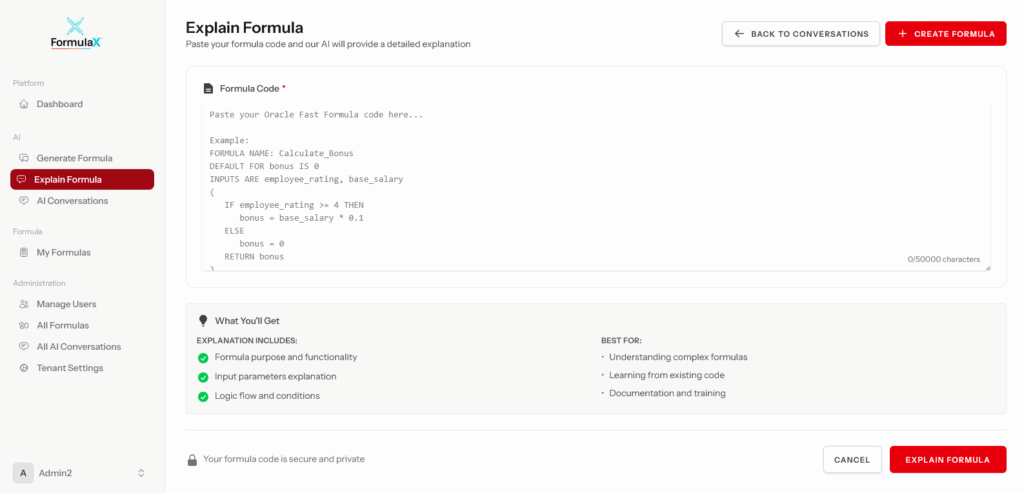
The Explain Formula page is where users can paste any existing Oracle Fast Formula code and receive a detailed, plain-English explanation of what the formula does. This powerful AI-driven feature breaks down complex formulas into understandable sections, making it ideal for knowledge transfer, onboarding, validation, and troubleshooting.
🎯 Purpose #
Explain Formula is designed to help you:
- Understand legacy formulas inherited from previous implementations
- Onboard new team members by providing clear explanations of existing formulas
- Validate formula logic before deployment to ensure it matches business requirements
- Document formulas for compliance and audit purposes
- Troubleshoot issues by understanding exactly what each section does
- Learn Fast Formula syntax by seeing how code translates to business logic
🔥 How It Works #
Step 1: Access Explain Formula #
Navigate to Explain Formula from the main menu or Dashboard quick actions.
Step 2: Paste Your Formula Code #
Copy the complete Fast Formula code from Oracle Cloud HCM and paste it into the text area. FormulaX accepts:
- Full formula definitions including INPUTS, RETURN statements, and logic
- Partial code snippets for quick analysis
- Formulas of any size (very large formulas are automatically split into sections)
Step 3: Click “Explain Formula” #
The AI assistant analyzes your formula and generates a comprehensive explanation.
Step 4: Review the Explanation #
The AI breaks down your formula section by section, explaining:
- Purpose: What the formula is designed to do
- Inputs: All input values and their data types
- Variables: Local variables and their purpose
- Business Logic: Step-by-step explanation of calculations and conditions
- Database Items (DBIs): Context variables being accessed
- Return Values: What the formula outputs
- Edge Cases: How the formula handles special scenarios
For large formulas, the explanation is divided into logical sections with clear headings.
💡 What You Get #
When you explain a formula, FormulaX provides:
Plain-English Description
- Clear, jargon-free explanation of what the formula does
- Business context for technical operations
- Identification of the formula type (Payroll, Absence, Element, etc.)
Code Breakdown
- Section-by-section analysis
- Explanation of INPUTS declarations
- Description of each calculation step
- Clarification of conditional logic (IF/THEN/ELSE)
- Translation of Oracle-specific functions (GET_CONTEXT, DAYS_BETWEEN, etc.)
Visual Highlighting
- Color-coded sections for easy reading
- Syntax highlighting of formula code
- Clear separation between explanation and code
🛠️ Common Use Cases #
1. Legacy Formula Documentation #
Paste in old formulas from previous consultants or implementations to understand what they do without manually tracing the logic.
Example: You inherit a complex payroll formula with no documentation. Paste it into Explain Formula to get instant clarity.
2. Training and Knowledge Transfer #
New team members can paste formulas they’re unfamiliar with and learn how they work without needing an experienced developer to explain.
3. Pre-Deployment Validation #
Before deploying a formula to production, explain it to verify the logic matches your business requirements.
4. Troubleshooting Errors #
When a formula produces unexpected results, paste it in to understand the exact calculation flow and identify where the issue might be.
5. Compliance and Audit #
Generate plain-English documentation of payroll or absence formulas for audit requirements or compliance reviews.
✅ Best Practices #
Paste Complete Formulas
- Include the full formula definition from INPUTS to RETURN statements
- This ensures the AI has full context for accurate explanations
Use for Complex Formulas
- The AI excels at breaking down intricate logic
- Particularly useful for formulas with nested conditions or multiple calculations
Review Formula Type Context
- If you know the formula type (Payroll, Absence, etc.), the explanation will be more accurate
- The AI automatically detects formula type from the code structure
Large Formulas
- Very large formulas are automatically split into manageable sections
- Each section is explained independently for clarity
Save Explanations
- After explaining, you can save the explanation alongside the formula for future reference
- Useful for building a knowledge base
🔍 Example Workflow #
Scenario: You need to understand a bonus calculation formula from your Oracle Cloud HCM system.
- Copy the formula from Oracle Cloud HCM > Payroll > Formulas
- Navigate to Explain Formula in FormulaX
- Paste the code into the text area
- Click “Explain Formula”
- Review the explanation:
- “This formula calculates quarterly bonus based on performance rating and base salary…”
- “INPUT: PERFORMANCE_RATING (number) – Employee’s quarterly rating from 1-5”
- “INPUT: BASE_SALARY (number) – Employee’s annual base salary”
- “Logic: If rating >= 4, bonus = 10% of salary. If rating >= 3, bonus = 5%…”
- Share or save the explanation for documentation
💬 AI Conversation #
The Explain Formula feature creates an AI conversation that you can continue. After receiving the initial explanation, you can:
- Ask follow-up questions: “What happens if PERFORMANCE_RATING is null?”
- Request clarification: “Can you explain the DAYS_BETWEEN function in more detail?”
- Explore alternatives: “How could this formula be optimized?”
- Get examples: “Show me an example calculation with sample values”
All conversations are saved in AI Conversations for future reference.
⚡ Tips for Better Explanations #
✅ Include full context: Paste complete formulas including all INPUTS and RETURN statements
✅ Add comments in code: If your formula has comments, they help the AI provide more accurate context
✅ One formula at a time: Explain one formula per request for clearest results
✅ Use for learning: Great way to understand Oracle Fast Formula syntax and best practices
❌ Don’t paste partial snippets without context – the AI needs to see the full logic flow
❌ Don’t expect formula fixes – this feature explains, it doesn’t modify code (use Generate/Optimize for that)
📊 Supported Formula Types #
FormulaX can explain all Oracle Cloud HCM Fast Formula types:
- Payroll Formulas: Element input values, earnings, deductions
- Absence Formulas: Accrual rules, duration calculations, eligibility
- Element Skip Formulas: Conditional element processing
- Validation Formulas: Data validation rules
- Time Calculation Formulas: Time entry processing
- Rate Calculation Formulas: Complex rate determinations
- Custom Formulas: Any valid Fast Formula syntax
❓ FAQ #
Q: How long does it take to explain a formula?
A: Most formulas are explained in 5-10 seconds. Very large or complex formulas may take 20-30 seconds.
Q: Can I explain formulas from older Oracle versions?
A: Yes, FormulaX supports Fast Formula syntax from older Oracle E-Business Suite versions as well as Oracle Cloud HCM.
Q: What if the explanation is unclear?
A: Use the AI conversation to ask follow-up questions for clarification. The AI can provide additional detail on specific sections.
Q: Can I explain formulas in other languages?
A: The AI explains formulas in English but can handle formula code with variable names in other languages.
Q: Is there a size limit?
A: No hard limit, but very large formulas (1000+ lines) are automatically split into sections for easier understanding.
Q: Can I export the explanation?
A: Yes, explanations can be copied, saved within FormulaX, or exported as part of the AI conversation history.
🎓 Learning Resources #
- See the Quick Start Guide for example formulas to practice with
- Visit AI Conversations to review past formula explanations
- Check Generate Formula to create new formulas based on explained logic
Need help? Contact MKSK Consulting Support or create a support ticket from the Support Features section.


